Tutorial Registrasi Pelatih (Coach) di Basketyuk (IBIS)
Daftar Isi
Daftarkan Pelatih Klub Anda dengan Mudah melalui Indonesian Basketball Integrated System (IBIS)
Registrasi pelatih di Basketyuk merupakan bagian dari Indonesian Basketball Integrated System (IBIS) yang memungkinkan klub mengelola data pelatih secara digital, terverifikasi, dan siap digunakan pada berbagai kompetisi basket di Indonesia.
Melalui sistem ini, klub dapat menambahkan pelatih, melengkapi profil, mengunggah dokumen pendukung, hingga menempatkan pelatih ke dalam roster tim secara terintegrasi. Seluruh proses mengikuti alur yang dijelaskan dalam panduan resmi Basketyuk.
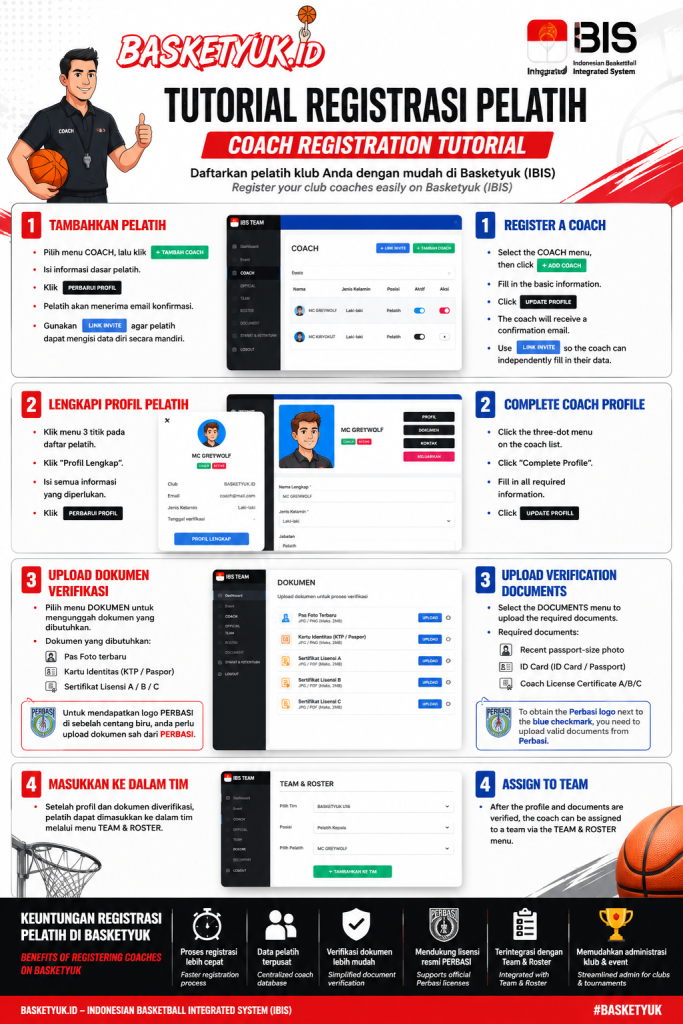
Langkah 1 — Tambahkan Pelatih
Masuk ke Dashboard IBIS kemudian:
Pilih menu Coach
Klik tombol Tambah Coach
Isi informasi dasar pelatih, meliputi:
Nama Lengkap
Jenis Kelamin
Jabatan
Nomor Identitas
Email
Tanggal Bergabung
Klik Tambah / Perbarui Profil setelah seluruh data terisi.
Setelah berhasil didaftarkan, sistem akan mengirimkan email konfirmasi kepada pelatih yang bersangkutan.
Alternatif lainnya, klub dapat membagikan Link Invite sehingga pelatih dapat mengisi data pribadinya secara mandiri.
Langkah 2 — Lengkapi Profil Pelatih
Setelah registrasi berhasil:
Klik menu tiga titik pada daftar pelatih.
Buka profil pelatih.
Pilih Profil Lengkap.
Lengkapi seluruh informasi yang diperlukan.
Klik Perbarui Profil.
Profil yang lengkap akan memudahkan proses verifikasi serta administrasi pada event yang menggunakan sistem IBIS.
Langkah 3 — Upload Dokumen Verifikasi
Masuk ke menu Dokumen, kemudian unggah dokumen berikut:
Pas Foto terbaru
Kartu Identitas (KTP atau Paspor)
Sertifikat Lisensi Pelatih A
Sertifikat Lisensi Pelatih B
Sertifikat Lisensi Pelatih C (sesuai kepemilikan)
Dokumen lisensi Perbasi akan menjadi dokumen pendukung proses verifikasi.
Catatan
Untuk memperoleh logo Perbasi di samping tanda centang biru pada profil pelatih, klub harus mengunggah dokumen lisensi Perbasi yang sah.
Langkah 4 — Masukkan Pelatih ke Dalam Tim
Setelah profil dan dokumen selesai diverifikasi, pelatih dapat ditambahkan ke roster tim melalui menu Team & Roster sesuai kebutuhan kompetisi.
Dengan demikian pelatih siap didaftarkan pada event yang menggunakan sistem Basketyuk dan IBIS.
Keuntungan Registrasi Pelatih di Basketyuk
Registrasi lebih cepat dan terpusat.
Profil pelatih tersimpan secara digital.
Verifikasi dokumen lebih mudah.
Mendukung penggunaan lisensi resmi Perbasi.
Terintegrasi dengan roster tim dan penyelenggaraan event.
Memudahkan administrasi klub dalam setiap kompetisi.
Coach Registration Tutorial on Basketyuk (IBIS)
Register Your Club Coaches Easily through the Indonesian Basketball Integrated System (IBIS)
Coach registration on Basketyuk is part of the Indonesian Basketball Integrated System (IBIS), enabling basketball clubs to manage coach profiles digitally and use verified data across basketball tournaments in Indonesia.
The platform allows clubs to register coaches, complete their profiles, upload verification documents, and assign them to team rosters within a single integrated system. The workflow follows the official Basketyuk registration guide.
Step 1 — Register a Coach
From the IBIS Dashboard:
Open the Coach menu.
Click Add Coach.
Fill in the coach's basic information:
Full Name
Gender
Position
Identification Number
Email Address
Joining Date
Click Add / Update Profile.
After registration is completed, the coach will automatically receive a confirmation email from Basketyuk.
Alternatively, clubs may share the Invite Link, allowing coaches to complete their own profile independently.
Step 2 — Complete the Coach Profile
Once the coach has been registered:
Click the three-dot menu beside the coach's name.
Open the coach profile.
Select Complete Profile.
Fill in all required information.
Click Update Profile.
A complete profile helps speed up verification and tournament administration.
Step 3 — Upload Verification Documents
Open the Documents menu and upload:
Recent passport-size photo
National ID Card or Passport
Coach License Certificate A
Coach License Certificate B
Coach License Certificate C (if available)
These certificates serve as supporting documents during the verification process.
Note
To obtain the Perbasi logo beside the blue verification badge, valid Perbasi license documents must be uploaded.
Step 4 — Assign the Coach to a Team
After the profile and documents have been completed and verified, the coach can be assigned to a team through the Team & Roster module.
The coach is then ready to participate in tournaments managed through the Basketyuk IBIS platform.
Benefits of Registering Coaches through Basketyuk
Faster digital registration process
Centralized coach database
Simplified verification workflow
Support for official Perbasi coaching licenses
Integrated with Team & Roster management
Streamlined administration for basketball clubs and tournament organizers